

By using this site, you agree to the Privacy Policy and Terms of Use.
Accept
OCR Technology Insights | A1-Tech.co.uk - Latest News & Expert Tips
  • OCR Online
    OCR OnlineShow More
    Online OCR guide: turn photos into editable documents
    Online OCR guide: turn photos into editable documents
    April 14, 2026
    Make scanned text useful: pick the right OCR tool for your work
    Make scanned text useful: pick the right OCR tool for your work
    April 13, 2026
    How to convert image to editable text using online OCR
    How to convert image to editable text using online OCR
    April 12, 2026
    Find clarity in pixels: top online OCR services for scanned documents and PDFs
    Find clarity in pixels: top online OCR services for scanned documents and PDFs
    April 11, 2026
    Online ocr explained: how to extract text from images for free
    Online ocr explained: how to extract text from images for free
    March 10, 2026
  • OCR
    OCRShow More
    How OCR technology saves hours of manual data entry for companies
    How OCR technology saves hours of manual data entry for companies
    March 8, 2026
    Make documents useful: choosing the best OCR software for your business
    Make documents useful: choosing the best OCR software for your business
    March 8, 2026
    Accessibility and Inclusivity: How OCR Benefits People with Visual Impairments
    October 4, 2023
    OCR and AI: The Synergy That Powers Intelligent Document Management
    October 4, 2023
    The Evolution of OCR Technology: From Early Beginnings to Modern Applications
    October 4, 2023
  • OCR Software
    OCR SoftwareShow More
    OCR vs AI text recognition: separating tools from intelligence
    OCR vs AI text recognition: separating tools from intelligence
    April 10, 2026
    Scan smarter: 15 ocr tools that save time
    Scan smarter: 15 ocr tools that save time
    April 9, 2026
    How OCR technology works: a simple guide for beginners
    How OCR technology works: a simple guide for beginners
    April 8, 2026
    Ten optical character recognition tools for 2026 that actually work
    Ten optical character recognition tools for 2026 that actually work
    April 7, 2026
    OCR reshapes patient care: digitizing medical records faster
    OCR reshapes patient care: digitizing medical records faster
    April 6, 2026
  • Tech News
    Tech NewsShow More
    Where technology is headed next: trends that will shape the decade
    Where technology is headed next: trends that will shape the decade
    April 15, 2026
    The biggest tech shifts you didn’t see coming (until now)
    The biggest tech shifts you didn’t see coming (until now)
    March 11, 2026
    Top 10 tech stories everyone is talking about right now
    Top 10 tech stories everyone is talking about right now
    March 11, 2026
    Spotify Premium to include free access to audiobooks in UK, Australia
    October 4, 2023
    Intel to spin out programmable chip unit, hold IPO; shares rise 2%
    October 4, 2023
  • Blog
Reading: Google Photos’ AI-powered Magic Editor feature to ship with Pixel 8 and 8 Pro
Best Deal
Aa
OCR Technology Insights | A1-Tech.co.uk - Latest News & Expert TipsOCR Technology Insights | A1-Tech.co.uk - Latest News & Expert Tips
  • OCR Online
  • Tech News
  • OCR
  • OCR Software
  • Adventure
Search
  • Home
  • Categories
    • OCR Online
    • Tech News
    • OCR
    • OCR Software
  • More Foxiz
    • Contact
    • Blog
10 real-world applications of OCR technology that touch daily life

10 real-world applications of OCR technology that touch daily life

Andrew Taylor Andrew Taylor April 4, 2026
Facebook Like
Instagram Follow
Youtube Subscribe
Tiktok Follow
  • Job @FoxizMagazine
  • Privacy Policy
  • Advertise
  • Subscribe
© Foxiz News Network. Ruby Design Company. All Rights Reserved.
OCR Technology Insights | A1-Tech.co.uk - Latest News & Expert Tips > Blog > Tech News > Google Photos’ AI-powered Magic Editor feature to ship with Pixel 8 and 8 Pro
Tech News

Google Photos’ AI-powered Magic Editor feature to ship with Pixel 8 and 8 Pro

Andrew Taylor
Last updated: 2023/10/04 at 6:41 PM
By Andrew Taylor 5 Min Read
Share
SHARE

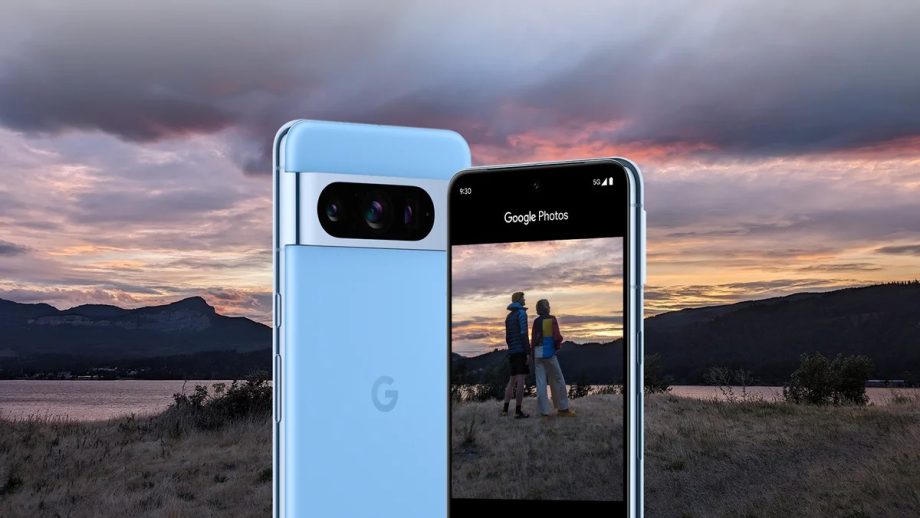
In the ever-evolving world of smartphone technology, Google is once again at the forefront with its upcoming Pixel 8 and 8 Pro models. These highly anticipated devices are set to include a groundbreaking feature that’s been making waves in the tech community: the AI-powered Magic Editor for Google Photos. With over a decade of experience in the field, we’ll delve into the intricacies of this exciting development and explore how it will enhance the photography experience for Pixel users.

Contents
The Evolution of Google PhotosUnleashing AI for Photo EditingTailored Editing for Every PhotoUser-Friendly InterfacePreserving OriginalsSeamless Integration with Pixel DevicesCloud-Powered ConveniencePrivacy and SecurityConclusion

The Evolution of Google Photos

Google Photos has long been a popular choice for smartphone users looking to organize, store, and edit their photos. Over the years, it has continually evolved, introducing new features and innovations. However, the Pixel 8 and 8 Pro are set to take this to a whole new level with the integration of the Magic Editor, which harnesses the power of artificial intelligence for a truly magical editing experience.

Unleashing AI for Photo Editing

One of the standout features of the Magic Editor is its ability to utilize AI algorithms to automatically enhance photos. This means that even novice photographers can achieve professional-quality results with minimal effort. The AI analyses each image to identify areas that could be improved, such as exposure, color balance, and sharpness. It then applies precise adjustments to bring out the best in each photo, resulting in stunning visuals that are sure to impress.

Tailored Editing for Every Photo

What sets the Magic Editor apart is its adaptability. It doesn’t use a one-size-fits-all approach; instead, it customizes edits based on the content of each image. Whether you’re capturing a breathtaking landscape or a candid portrait, the AI-powered editor understands the unique characteristics of each photo and applies enhancements accordingly. This ensures that your memories are preserved in all their glory, no matter the subject.

User-Friendly Interface

While the technology behind the Magic Editor is cutting-edge, Google has made sure that the user experience remains intuitive and straightforward. The interface is designed to be user-friendly, with a minimal learning curve. Users can easily access the Magic Editor within the Google Photos app and apply its enhancements with just a few taps, making it accessible to photographers of all skill levels.

Preserving Originals

One concern users often have when using AI-powered editing tools is the fear of losing the original character of their photos. With the Magic Editor, this is not an issue. Google Photos ensures that the original photo is always preserved, allowing users to compare the edited version with the original and revert to it if desired. This provides peace of mind and the freedom to experiment with edits without the risk of losing cherished memories.

Seamless Integration with Pixel Devices

The Magic Editor is seamlessly integrated into the Pixel 8 and 8 Pro camera apps, allowing users to edit their photos right after capturing them. This real-time editing capability ensures that you can immediately enhance your photos before sharing them with friends and family or posting them on social media. The integration is so smooth that it feels like magic happening right in your hands.

Cloud-Powered Convenience

With the power of Google’s cloud computing, the Magic Editor can perform complex AI-enhancements without bogging down your device’s performance. This cloud-powered approach ensures that the editing process is swift and efficient, allowing you to edit multiple photos quickly and effortlessly.

Privacy and Security

Google places a strong emphasis on user privacy and security. When using the Magic Editor, your photos remain private, and the AI processing is done securely within Google’s infrastructure. Your data is protected, and you have control over what you choose to share.

Conclusion

The introduction of the AI-powered Magic Editor in the Google Pixel 8 and 8 Pro marks a significant leap in smartphone photography. This innovative feature empowers users to effortlessly transform their photos into works of art, regardless of their photography skills. With its adaptability, user-friendly interface, and seamless integration, it’s poised to redefine how we capture and cherish our memories.
Andrew Taylor October 4, 2023 October 3, 2023
Share This Article
Facebook Twitter Copy Link

How OCR is Transforming Data Entry and Document Digitization

Andrew Taylor Andrew Taylor October 4, 2023
Facebook Like
Instagram Follow
Youtube Subscribe
Tiktok Follow

Trending

How to convert image to editable text using online OCR

Turning a photo or scanned page into editable text feels like magic once you know…

April 12, 2026

Best OCR Software of 2023: Unleashing the Power of Optical Character Recognition

In today's digital age, data is king. Whether it's converting printed documents into editable text…

September 4, 2023

OCR reshapes patient care: digitizing medical records faster

Paper charts, faxed lab results, and handwritten notes have long been the speed bumps of…

April 6, 2026
Tech News

Where technology is headed next: trends that will shape the decade

Where technology is headed next: trends that will shape the decade

We stand at a crossroads where tools that once lived in labs are folding into everyday life, changing how we work, travel, and think about privacy. The Future of Technology:…

Andrew Taylor April 15, 2026

Your may also like!

Where technology is headed next: trends that will shape the decade
Tech News

Where technology is headed next: trends that will shape the decade

Andrew Taylor April 15, 2026
Online OCR guide: turn photos into editable documents
OCR Online

Online OCR guide: turn photos into editable documents

Andrew Taylor April 14, 2026
Make scanned text useful: pick the right OCR tool for your work
OCR Online

Make scanned text useful: pick the right OCR tool for your work

Andrew Taylor April 13, 2026
How to convert image to editable text using online OCR
OCR Online

How to convert image to editable text using online OCR

Andrew Taylor April 12, 2026

Our website stores cookies on your computer. They allow us to remember you and help personalize your experience with our site.


Quick Links

  • Job @FoxizMagazine
  • Privacy Policy
  • Advertise
  • Subscribe

Socials

Follow US
Welcome Back!

Sign in to your account